
Posted by  MOES-Admin on
MOES-Admin on How do I change the numbering and prefix of my invoices in WooCommerce?
- Open your admin dashboard located at ‘https://<your-site>/wp-admin’
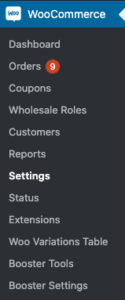 Locate the ‘WooCommerce’ options located at the left hand side, open it and click Booster Settings, if you can’t see this you do not have the correct permissions or have this feature enabled.
- On the page that opened you’ll find a link that says ‘PDF Invoicing & Packing Slips’, click it and you will open the settings page. Click the link that says ‘numbering’
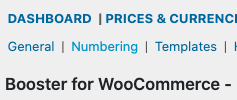
- On this page you can edit the prefix, counter, if the numbering should be sequential and a counter width, if this is set the counter will be padded by 0’s until the width is reached